Last time, I blogged The SHA1s and CRC are all different for each Windows 7 x86 ISO and x64 ISO. Why? As I said earlier all Windows 7 ISO images are ALL in ONE images, means The ISOs have all editions of Windows 7. But the question is now that do we have to download every ISO image for each editions and burn separate 8 discs?
After doing some R&D, I have figured out the configuration of ISO’s for a particular edition, so the answer is- You just have to burn 2 discs only to have all editions. One for x86 and one for x64 editions. Just follow the simple steps.
How To:
1. Download any Windows 7 RTM ISO image from MSDN or TechNet websites. Say we have Ultimate edition.
2. Use 7-zip to extract that ISO to a particular folder and go to Source folder and look for ei.cfg file.
EI.cfg is a Windows Setup-specific configuration file used to determine what edition and license will be used during installation. This file replaces PID.txt and is located on the product media under the Sources folder in Windows Vista DVD
To get desired edition-
3. Use Notepad to edit and save this file by change desired EditionID. Valid EditionIDs are:
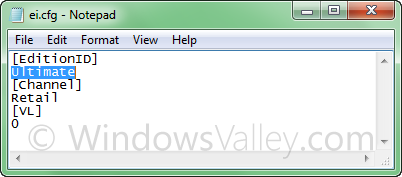
- Ulimate
- Professional
- HomePremium
- HomeBasic
- Starter
To get all editions-
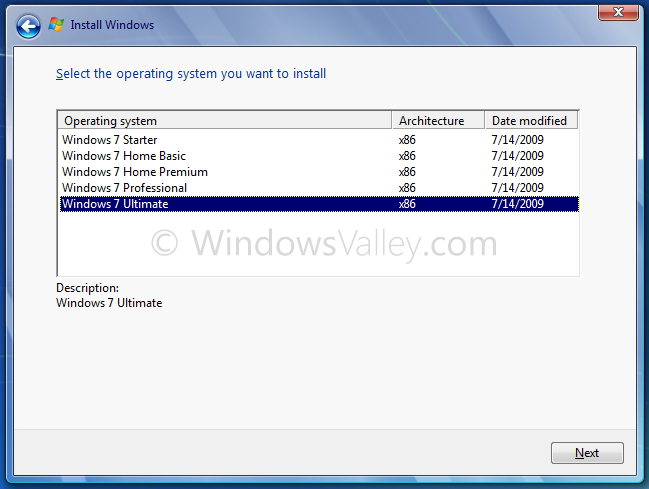
4. Just delete the file and finally create the bootable ISO and burn your unlocked disc.
Applies To:
- Windows 7 family(x86 and x64)
- Windows Server 2008 R2 family(x86 and x64)


THIS WORKED PERFECTLY!!!
I also found inside the “source” folder a “product” .ini file that included all the license keys for all versions on win 7.
I purchased win 7 pro online and downloaded it (it’s a .iso image) and saved it so I could burn in to a dvd. After you do the above stated stuff(like deleting the ei.cfg file so that the new .iso I created functioned as a win 7 disc for al versions of win 7) I did the “anytime upgrade”, as I was upgrading from my Win 7 pro to Win 7 Ultimate, entered the license key that I found in the downloaded .iso and it worked perfectly! Totally license and real version. This was all tested on a LICENSED and not cracked version from Microsoft, just fyi
Too bad in using the key from “product.ini” will make it so that you will either need to buy a valid ultimate license key or reinstall in 30 days… The keys in the “product.ini” file are “default” keys they are the keys that setup will use if yo fail to provide a key during the install, they are intended to allow you an install when you don’t have your legit key available but DO have one, and it then gives you 30 days to get/find it. Using windows anytime upgrade works with this key for the same reason, but just like a regular install it will need a “real” key within 30days or windows will go non-genuine/etc. you can verify this yourself by right clicking on the computer icon and choosing properties and then scrolling to the bottom of the computer/os info to where it shows your licensing status. Which will say something to the effect of you having XX days to activate(“Default” keys do not activate)
Neat little guide.
So far I’ve integrated 33 versions into one DVD.
All versions of Windows 7 (x86 & x64), including Enterprise. All ‘N’ versions, and all ‘E’ versions. Right now attempting to streamline the ‘K’ and ‘KN’ versions, so 45in1?
Hope it works!