Help & How-to
Unlock all editions from Windows 7 ISO image (x86 and x64)
Last time, I blogged The SHA1s and CRC are all different for each Windows 7 x86 ISO and x64 ISO. Why? As I said earlier all Windows 7 ISO images are ALL in ONE images, means The ISOs have all editions of Windows 7. But the question is now that do we have to download every ISO image for each editions and burn separate 8 discs?
After doing some R&D, I have figured out the configuration of ISO’s for a particular edition, so the answer is- You just have to burn 2 discs only to have all editions. One for x86 and one for x64 editions. Just follow the simple steps.
How To:
1. Download any Windows 7 RTM ISO image from MSDN or TechNet websites. Say we have Ultimate edition.
2. Use 7-zip to extract that ISO to a particular folder and go to Source folder and look for ei.cfg file.
EI.cfg is a Windows Setup-specific configuration file used to determine what edition and license will be used during installation. This file replaces PID.txt and is located on the product media under the Sources folder in Windows Vista DVD
To get desired edition-
3. Use Notepad to edit and save this file by change desired EditionID. Valid EditionIDs are:
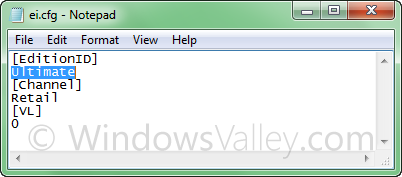
- Ulimate
- Professional
- HomePremium
- HomeBasic
- Starter
To get all editions-
4. Just delete the file and finally create the bootable ISO and burn your unlocked disc.
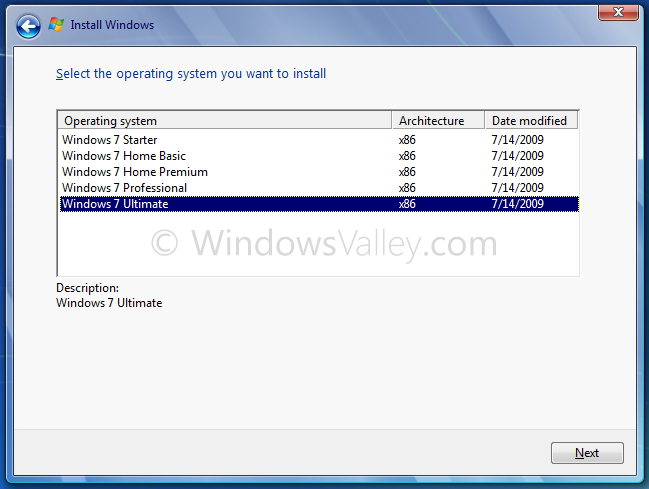
Applies To:
- Windows 7 family(x86 and x64)
- Windows Server 2008 R2 family(x86 and x64)
Tags: Fix It, How to, Tips and Tricks, Windows 7, Windows 7 Beta, Windows 7 RC, Windows 7 RTM
hey..
it doesn’t work for me…
i have windows 7 professional ISO.. and after i extract it.. deleted ei.cfg.. then rebuild it with oscdimg.exe.. that still professional version..
is there ultimate ISO required?
It seems You have OEM version of Windows 7 (shipped with PC/Laptop)
hmm… thanks for your quick reply…
i think i have professional VL ISO… and it’s not work as standard professional ISO because it only have professional.clg…
so yesterday i’ve done to download standard version of 7 professional and it’s work! thanks for this tips…
Question, i had the Professional 64 but unfortunately i downloaded in spanish, i know my KEY will work on any language, but i can not find a Professional 64 in English on the internet to download it. I had the Home Premium 32 UPGRADE from an HP Notebook version on a CD and i can do this trick but that will work to convert it to Professional 32? Also i downloaded a MICROSOFT.WINDOWS.7.ULTIMATE.7600.16385.RTM.X64.RETAIL.ENGLISH.DVD-WZT from a Torrent, i verified the ISO and looks working but when i tried to find the ei.cfg file i can not find it. What can i do? I had both RC in 32 and 64 i downloaded fro Microsoft when they were available, can i do the trick on those and use my KEY ?
Thanks and sorry for so many questions
Hello, i used the DVD i downloaded from the torrent and it WORKED, as is described i just select the professional version in 64 bits and is installed on my PC, i did the trick doing a custom installation and not using my KEY then i run it again and select upgrade to finally use my KEY and is been activated by Microsoft. I just need to download the same Ultimate version in 32bits and have it physically in case i want to go back for 32bits instead of 64bits.
I do not remeber where i read that my key works for both systems but also that i can be used on 2 different PC one with 32bits and one with 64bits and according to those is legal. Any comments?
Thanks
I need key to continue with Windows 7 installation.
Please.
Thanks