Ultimate Windows Tweaker v2.1 Released, Download now

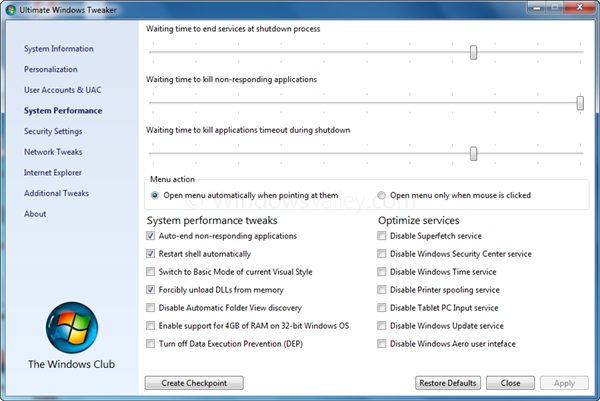
We are pleased to announce, Ultimate Windows Tweaker has been updated to v2.1. Its not a major release, but includes important bug fixes.

It is a freeware Tweak UI Utility for tweaking and optimizing Windows 7 & Windows Vista, all editions. You can simply download and use as a portable application. It doesn’t require installation and can be carried out in USB removable device/pen drive. it covers more than 150 tweaks and settings.
Change log:

# FIXED: UnauthorizedAccessException occurred when click on Apply button on System Performance page.
# FIXED: Crashing on non-English version of Windows Vista/Windows 7, when enable or disable unused services.
# IMPROVED: Optimize services methods re-written.
# ADDED: Switch to basic mode of current Visual Style.
# REMOVED: Disable Built-in feature to manage folders.

UltimateWindowsTweaker2.1

You can download the latest release (v2.1) from here.

download

Searched terms:

ultimate windows tweaker v2, ultimate windows tweaker v2 1, switch to basic mode of current visual style, basic mode of current visual style, tweaker v2 1, ultimate windows tweaker task manager, ultimate windows tweaker v 2 1, Ultimate Windows Tweaker V2 1 Download, ultimate windows tweaker windows 7 not working, ultimate windows tweakerenable 4 gig

13 Comments

It works like a charm.
Thank you very much for the very excellent tools you develop

Regards

Before I purchase more ram I was hoping someone would answer my question with this utility.
Has anyone tried to enable 4 gig with Windows 7 32 bit OS yet and did it work?
Some screen shots would be greatly appreciated.

Thanks Allot

    I tried couple times this option on different notebooks with W7x86 4GB RAM and it didn`t work.

The applications format does not fit most netbooks! BEWARE! The typical/maximum 1024 x 600 netbook screen makes it impossible to get to the “OK”, etc buttons on the bottom of the form/dialog. Without some way to scroll the form, the app’s functionality is lost to netbook users who desperately need this resource. Ideas?

    thanks for your feedback. I never tried it on Netbooks and no value of all these tweaks, if it is impossible to use on low-end PCs. I consider it as the Most Valuable Feedback. Thanks again Wiley!

    Use external screen if you consider this app is strictly necessary for you

Thanks Buddy. Very COOL :-) It is a Powerfull Tool. Great.

Hi Ram u are amazing and doing a great job. By the way i love the comments people have about you and your software solutions.
With Regards
D

Hi,

Love this app. It reaches parts that other apps just don’t reach!

However, I was hoping it would be capable of removing those pesky shortcut arrows from all the icons on my desktop. . .but on the app’s Additional Tweaks tab the option to “Remove arrows from Shortcut Icons” is greyed out.

What’s happening here and how can this option be enabled?

(Win 7, 64-bit)

Kind regards,

RT

Running Windows 7 with all the updates. Ultimate Windows Tweaker has worked previously, like two days ago, but when I launch it nothing shows up on the screen.The program gets launched. When I open task manager, Ultimate Windows Tweaker shows up there but not on the screen. Any thoughts?

Thanks,
NJR

Hi.

Just downloaded UWT 2.1 for the first time. Runs without problem but one or two particular tweaks I would like to make seem not to work.

Most useful to me is the option to enable “Support of 4Gig RAM on 32 bit OS”, but ticking this choice and then allowing Win to restart, still only 3.25 (or thereabouts) is “seen” and listed by UWT. Is this expected?

Also the Internet Explorer Tab on UWT opening screen does nothing; no window opens. Again, is this expected?

Win 7 32 bit SP1, 4Gig RAM, Intel Q9650, IE 9.0.3.

Thanks.

Add Comment