The article describes step by step intructions to install Firefox or other web browser on Windows 7 E. This includes Windows 7 E Home Premium, Windows 7 E Professional, Windows 7 E Ultimate and Windows 7 E Starter editions. This version of Windows 7 will not include a browser (for example: it will not come with Internet Explorer 8).
As a result, you will need to separately install a web browser to surf internet, for instance here is the guide to install for Firefox without Internet Explorer.
How To:
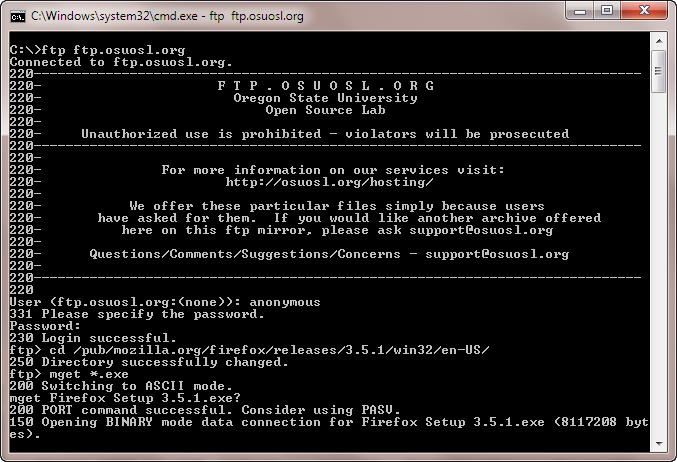
1. Run Command Prompt and run the following commands. (make sure internet is connected)
ftp ftp.osuosl.org
2. Type User Name: anonymous and password: ****** (specify a password any thing but something ;) not blank)
3. After successful login, change directory to: /pub/mozilla.org/firefox/releases/3.5.1/win32/en-US/. You may alter language and release version as per latest release available.
cd /pub/mozilla.org/firefox/releases/3.5.1/win32/en-US/
4. Now execute the command to get Firefox package.
mget *.exe
5. Press enter to start downloading Firefox package, that will be downloaded in your user profile folder.
With help of these instructions, you can download Opera too.
FTP: ftp.opera.com
Directory path: /pub/opera/win/1000b2/en
Applies To:
- Windows 7 E Ultimate
- Windows 7 E Professional
- Windows 7 E Home Premium
- Windows 7 E Starter


Leave a Reply