If you are fond of Keyboard and usually use it to operate your PC without mouse. This tip makes the keyboard easier to use and highlights access keys of controls.
In the Windows world, all controls on dialog boxes fire events to accomplish the tasks, that’s why Windows Form Controls are known as Event Driven Controls. Users mostly use Mouse to fire events by clicking or right click on buttons, checkboxes, radio buttons and so on. But Windows also allows to access form’s control by access key, that is activated when you hold ALT key.
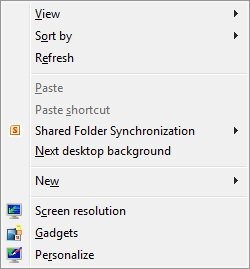
By following these simple steps, you can enable all keyboard shortcuts and get access keys activated permanently without holding ALT key.
How To: Method 1:
1. Go to Control Panel>Ease of Access>Ease of Access Center>Make the keyboard easier to use
2. Under ‘Make it easier to use keyboard shortcuts’, check Underline keyboard shortcuts and access keys and click on OK or Apply to commit changes.

3. You’re done! Now you will see all access key character underlined.
Method 2:
1. Run Registry Editor and go to HKEY_CURRENT_USER\Control Panel\Accessibility\Keyboard Preference
2. Now create or modify a String Value (REG_SZ) called On and set its value to 1
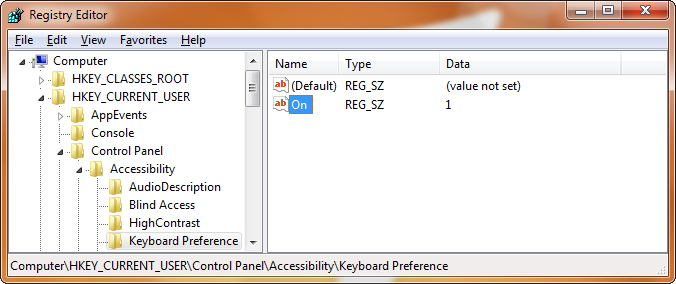
3. Logoff your PC to take effect.
Applies To:
- Windows Vista
- Windows 7
- Windows Server 2008
- Windows Server 2008 R2


Leave a Reply