BitLocker Drive Encryption is full disk encryption feature of Windows 7 and Windows Vista. It is available in Enterprise and Ultimate editions only. In Windows 7, the feature has been re-invented and offers a handy ‘Turn On BitLocker’ context menu for Drives including USB storage devices.
Some Registry Cleaner programs doesn’t recognize the valid context menu and wipe the ‘Turn On BitLocker’ menu and are cause of missing menu.
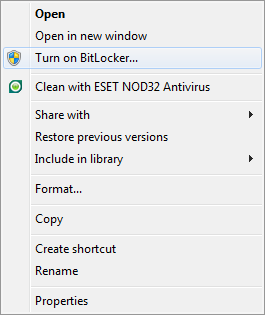
So here, I’m sharing the Registry Fix, that restores the context menu. Download the zip file and extract it. Run Registry patch, that’s it.
Applies To:
- Windows 7 Ultimate
- Windows 7 Enterprise
- Windows Server 2008 R2


Leave a Reply