BitLocker Drive Encryption is full disk encryption feature of Windows 7 and Windows Vista. It is available in Enterprise and Ultimate editions only. In Windows 7, the feature has been re-invented and offers a handy ‘Turn On BitLocker’ context menu for Drives including USB storage devices.
Some Registry Cleaner programs doesn’t recognize the valid context menu and wipe the ‘Turn On BitLocker’ menu and are cause of missing menu.
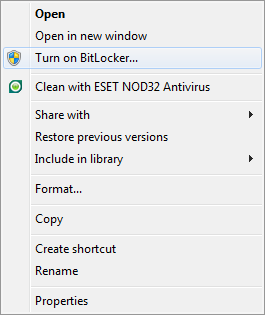
So here, I’m sharing the Registry Fix, that restores the context menu. Download the zip file and extract it. Run Registry patch, that’s it.
Applies To:
- Windows 7 Ultimate
- Windows 7 Enterprise
- Windows Server 2008 R2
Searched terms:
bitlocker missing from control panel, bitlocker missing, turn on bitlocker missing, windows 7 bitlocker missing, bitlocker control panel missing, bitlocker not showing in control panel, bitlocker missing in control panel, remove turn on bitlocker, bitlocker missing windows 7, windows 7 missing bitlocker
6 Comments
Thanks a lot Ramesh for this registry file……..i messed up the same as you said……now everything is fine, i got my bitlocker menu back :)
Huge thanks :)
Your welcome !!!
did not work for me…..
The fix didn’t work for me. I encrypted the D: Partition with BitLocker an after a while the BitLocker menu disapeared both from control panel and explorer meny. Even if i right click on the disk icon it’s gone. Very frustrating.
Haha! I realize that i turned on bitlocker while i had the beta version of Win 7. That was actually an Ultimate version. Now i’m stuck. An upgrade is very expensive and takes a lot of time. Any way to come around it?
Add Comment