Yesterday I was installing newly released Visual Studio 2010 RTM on my Windows 7 running PC and Setup encountered the error while installing SQL Server 2008 Express Service Pack 1.
Actually I was using pre-release version of Visual Studio 2010 (RC) and uninstalled before prior to install retail release (RTM) of Visual Studio 2010 as instructed. Everything went fine except Visual Studio 2010 RTM Setup that logged the error in log file.
[04/13/10,10:00:09] Microsoft SQL Server 2008 Express Service Pack 1 (x64): [2] Error code 2064843076 for this component is not recognized.
[04/13/10,10:00:09] Microsoft SQL Server 2008 Express Service Pack 1 (x64): [2] Component Microsoft SQL Server 2008 Express Service Pack 1 (x64) returned an unexpected value.
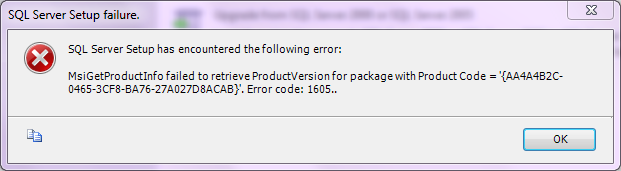
Then I tried to install SQL Server 2008 Express manually (out of Visual Studio setup) to know the exact error message and it was-
MsiGetProductInfo failed to retireve ProductVersion for package with Product Code = ‘{AA4A4B2C-0465-3CF8-BA76-27A024D8ACAB}’. Error code: 1605
The GUID {AA4A4B2C-0465-3CF8-BA76-27A024D8ACAB} may different on different machines
After observing few aspects, I got the solution and would like to share it with you. To fix the error, you need to follow these simple steps.
How To:
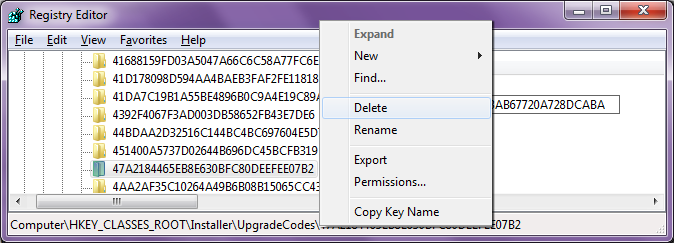
1. Run Registry Editor (type regedit in Start Search or Run dialog box and press enter) and navigate to- HKEY_CLASSES_ROOT\Installer\UpgradeCodes
2. Take the first part of GUID and reverse it, in my case it is AA4A4B2C and its reverse string is C2B4A4AA. Now search for C2B4A4AA and you’ll get a match than delete the its parent subkey (it will be a kind of GUID without braces).
3. Now run the Setup again, it will go smoothly without any hassle.
Applies To:
- SQL Server 2008
- SQL Server 2008 Express


Leave a Reply