
Yesterday I have tried to install SQL Management Studio Express on Vista Business x64. But An error code 29506 encountered and installation failed and roll-back.
I have observed that most of apps based on MSI (.msi) encountered in Windows Vista, when UAC enabled. The main problem with MSI files is that you cannot right click it and “Run as Administrator” to bypass UAC validation. To solve this problem, Either you have to logged-in as Default Administrator account or disable UAC.
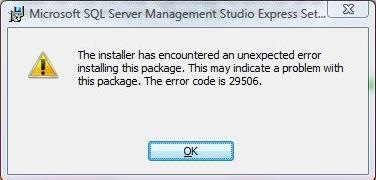
But don’t worry, There is another way to install SQL Management Studio Express on Windows Vista x64 flawlessly.
How To:
- Run CMD as Administrator and Approve the UAC prompt and type the full absolute path of the MSI file, Such as:
- Follow your screen instruction and be happy with Windows Computing.
C:\>E:\Downloads\SSMS_x64.msi
Applies To:
- Windows Vista x64 editions
- Windows 7 x64 editions

Leave a Reply