If you use Firefox and want to show thumbnail previews for individual tabs on Firefox in Windows 7 as Internet Explorer shows, follow these simple instructions & enhance your user experience with Firefox on Windows 7.
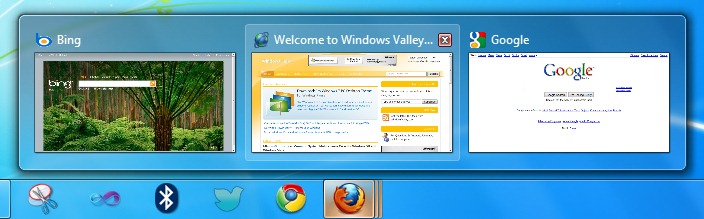
Windows 7 Taskbar is totally different from earlier version Windows. It has big icons, jumplists, live thumbnail previews, pinning options etc. Developers are welcoming these fascinating features and adding theme to their applications. Last week Mozilla released Firefox 3.6 and it has locked feature to show thumbnail previews for individual tabs. To unlock it, follow these steps:
How To:
1. Run Firefox and type about:config in address bar and press enter, it will confirm about changing these advanced settings ….etc. Just click on I’ll be careful, I promise!
2. In Filter field, type taskbar. It will short all taskbar settings.
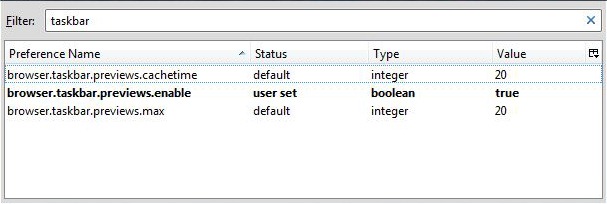
3. Now double click on browser.taskbar.previews.enable to set it to true Or right-click on it and select Toggle. It’ll set its value to true.
4. Close Firefox and re-launch and you will see separate previews for individual tabs on Taskbar.
Applies To:
- Firefox 3.6
- Windows 7 Home Premium
- Windows 7 Professional
- Windows 7 Ultimate
- Windows 7 Enterprise


Leave a Reply