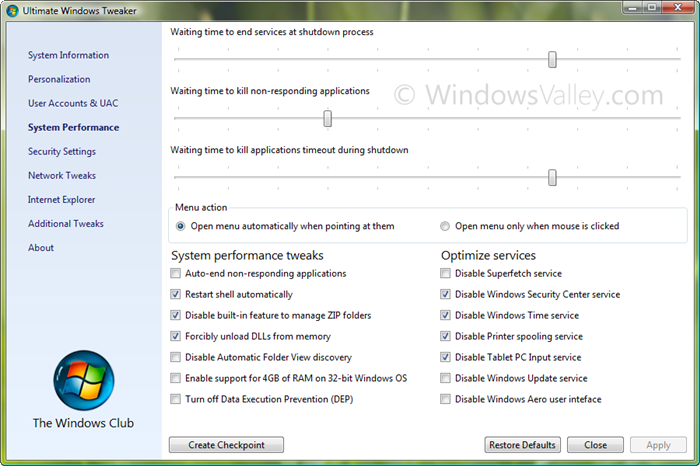
So wait is over, Ultimate Windows Tweaker v2.0 is available. It is a freeware Tweak UI Utility for tweaking and optimizing Windows 7 & Windows Vista, all editions. You can simply download and use as a portable application. With judicious tweaking, it makes your system faster, more stable, and more secure with just a few mouse clicks.
It is a 345KB executable, that doesn’t require installation and can be carried out in USB removable device/pen drive. This time, it covers more than 150 tweaks and settings.
Change log:
# Support Windows 7
# Display tweak and settings according to Windows version.
# Revamped UI similar to Windows 7/Vista UI controls
# IMPROVED: Optimize services, enable/disable services and start/stop as well instantly
# FIXED: Apply button is activated only and only, when changes are done.
# FIXED: Left pane overlapped far left controls with higher DPI setting
# FIXED: Ultimate Windows Tweaker is crashed every time on 64 bit Windows OS, when Apply button clicked
# FIXED: Hangs when external commands are executed like Reset IE, Launch System Properties etc.
# FIXED: Crashing on System Performance page, on Windows 7/Vista non-English editions.
– On System Information page
+ Version with build no (removed in Beta build)
+ System Rating
+ Computer description
– On Personalization page
+ Disable Aero shake
+ Disable Aero Snap
+ Enable Jump list and nos. of jump list items
+ Sorted Start menu with all Windows 7 items
+ Bing Search replaced Live Search in Custom Start Search
+ Use large icons on Taskbar
+ Disable Aero Peek preview
+ Group when Taskbar full is added
– User Accounts & UAC
+ Welcome screen text and buttons’ effects
+ Set custom background on Welcome screen (OEM Background)
– System Performance page
+ Track bars’ Tooltip shows actual value in milliseconds
+ Improved “Menu action”
+ Improved “Enable support for 4GB of RAM on 32bit Windows”
+ Disable Windows Security Center service
– Security Settings
+ Disable System Restore settings
+ Disable Change Color and Appearance
+ Disable to skip starting programs by pressing Shift key
– Internet Explorer
+ Reset IE to factory default button added
-Additional Tweaks
+ Disable Windows Startup sound
+ Disable page file (Virtual Memory)
+ Enable Large System cache
+ Delete page file during shutdown process
Don’t detach empty.ico file, otherwise a tweak entitled Remove arrows from shortcut icons won’t work.
[download]
Ultimate Windows Tweaker v2.0 for Windows 7
[/download]


Leave a Reply