After doing lots of R & D on Windows Vista, I have found a registry hack that enables all tasks control panel and system settings at one place…!
It’s much similar to Windows 7’s Control Panel (Classic View) or you can say, it’ll explorer more controls and tasks than Windows 7 Control Panel.
How To:
Method 1:
1. Create a new folder and name it Master Control.{ED7BA470-8E54-465E-825C-99712043E01C}
2. The icon will be changed automatically to Control Panel’s icon. Now open the folder and see the magic of Windows Registry!
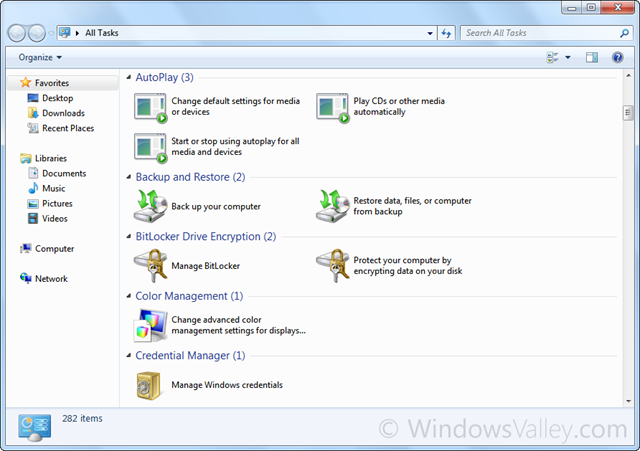
Method 2: (Thanks to my friend Marc F.)
Create a shortcut with following path and set desired icon:
explorer.exe shell:::{ED7BA470-8E54-465E-825C-99712043E01C}
Note: Sometimes…it kills explorer.exe using Method 1! probably Windows Vista x64 editions. Therefore I suggest to use Method 2.
To get rid of this issue, Boot into Safe Mode with Command Prompt and delete that folder. For eg. You created a folder Master Control.{ED7BA470-8E54-465E-825C-99712043E01C} on desktop, So either navigate to Desktop folder execute the following command:
RmDir “Master Control.{ED7BA470-8E54-465E-825C-99712043E01C}”
Or type the absolute path of folder, like-
RmDir “C:\Users\<User-Name>\Desktop\Master Control.{ED7BA470-8E54-465E-825C-99712043E01C}”
Want to know the story behind the God Mode, It may interest to you Windows 7 God Mode – Behind the Scenes.
Applies To:
- Windows Vista x86 editions
- Windows Vista x64 editions
- Windows 7 x86 editions
- Windows 7 x64 editions


Ouch! I think I’m hosed. I don’t have a second user and no restore point. The master control folder can’t be found. Anyone else in the same boat?
Same here Glar, windows explorer is not responding, it is even crashing windows in SAFE Mode….
this isn’t working
epikx23@gmail.com
If explorer keeps crashing do the following:
Ctrl – Shift – Escape opens the Task Manager
Run Command -> cmd
Navigate to folder and delete it as described above.
Restart Explorer.
No Reboot or Safe Mode required.
Thanks for the tip !!! post has been updated.
hey… i did this and now it keeps saying “windows searcher doesn’t work (or windows verkenner) and it restarts and then it keeps saying that can u plz help me i cant do anything now plz help me
Why don’t you try 2nd Method.
this isn’t working
i tried both methods its saying cannot find the file…..
im willing to pay $20 to whoever helps me
epikx23@gmail.com
Here are a few more.
GodModes are shortcuts used by developers to services and settings on your Windows Vista and Windows 7 (and later) hard drives. Do not use these on 64-bit computers or they will crash. You may use these on your Desktop or in Windows Explorer. There are 41 GodModes in this list. If there are more, I couldn’t find them by searching with Google.
How To Use Them: Right-click your Desktop and make a New Folder. Paste one of the long lines of text below into the folder name and press enter. If it works on your system the folder will become an icon. If not, then it will be an empty folder. Just delete it and try another one.
I created a New Folder on my desktop called “GodModes” and dragged all of the icons into it to keep them out of the way until I need them.
=========================================
GOD MODES FOR WINDOWS VISTA AND WINDOWS 7
=========================================
Administrative Tools.{D20EA4E1-3957-11d2-A40B-0C5020524153}
All .NET Frameworks and COM Libraries.{1D2680C9-0E2A-469d-B787-065558BC7D43}
All Tasks (Control Panel).{ED7BA470-8E54-465E-825C-99712043E01C}
AutoPlay.{9C60DE1E-E5FC-40f4-A487-460851A8D915}
BitLocker Drive Encryption (Ultimate edition only).{D9EF8727-CAC2-4e60-809E-86F80A666C91}
Computer Folder.{20D04FE0-3AEA-1069-A2D8-08002B30309D}
Default Programs.{17cd9488-1228-4b2f-88ce-4298e93e0966}
Ease of Access Center.{D555645E-D4F8-4c29-A827-D93C859C4F2A}
Font Settings.{93412589-74D4-4E4E-AD0E-E0CB621440FD}
Microsoft Games.{ED228FDF-9EA8-4870-83b1-96b02CFE0D52}
Get Programs.{15eae92e-f17a-4431-9f28-805e482dafd4}
Control Panel.(Lots Of Settings).{ED7BA470-8E54-465E-825C-99712043E01C}
Manage Wireless Networks.{1FA9085F-25A2-489B-85D4-86326EEDCD87}
Network and Sharing Center.{8E908FC9-BECC-40f6-915B-F4CA0E70D03D}
Network Connections.{7007ACC7-3202-11D1-AAD2-00805FC1270E}
Network Folder.{208D2C60-3AEA-1069-A2D7-08002B30309D}
Parental Controls.{96AE8D84-A250-4520-95A5-A47A7E3C548B}
Performance Information and Tools.{78F3955E-3B90-4184-BD14-5397C15F1EFC}
Personalization.{ED834ED6-4B5A-4bfe-8F11-A626DCB6A921}
Power Options.{025A5937-A6BE-4686-A844-36FE4BEC8B6D}
Programs and Features.{7b81be6a-ce2b-4676-a29e-eb907a5126c5}
Sync Center.{9C73F5E5-7AE7-4E32-A8E8-8D23B85255BF}
System.{BB06C0E4-D293-4f75-8A90-CB05B6477EEE}
User Accounts.{60632754-c523-4b62-b45c-4172da012619}
Windows Firewall.{4026492F-2F69-46B8-B9BF-5654FC07E423}
Windows SlideShow.{E95A4861-D57A-4be1-AD0F-35267E261739}
Windows Update.{36eef7db-88ad-4e81-ad49-0e313f0c35f8}
============================
GOD MODES FOR WINDOWS 7 ONLY
============================
Action Center.{BB64F8A7-BEE7-4E1A-AB8D-7D8273F7FDB6}
Backup and Restore.{B98A2BEA-7D42-4558-8BD1-832F41BAC6FD}
Biometric Devices.{0142e4d0-fb7a-11dc-ba4a-000ffe7ab428}
Credential Manager.{1206F5F1-0569-412C-8FEC-3204630DFB70}
Default Location.{00C6D95F-329C-409a-81D7-C46C66EA7F33}
Devices and Printers.{A8A91A66-3A7D-4424-8D24-04E180695C7A}
Display.{C555438B-3C23-4769-A71F-B6D3D9B6053A}
HomeGroup.{67CA7650-96E6-4FDD-BB43-A8E774F73A57}
Location and Other Sensors.{E9950154-C418-419e-A90A-20C5287AE24B}
Notification Area Icons.{05d7b0f4-2121-4eff-bf6b-ed3f69b894d9}
Recovery.{9FE63AFD-59CF-4419-9775-ABCC3849F861}
RemoteApp and Desktop Connections.{241D7C96-F8BF-4F85-B01F-E2B043341A4B}
Speech Recognition.{58E3C745-D971-4081-9034-86E34B30836A}
Troubleshooting.{C58C4893-3BE0-4B45-ABB5-A63E4B8C8651}
Nice idea. This is a great blog.
I found this and worked well for me( i was so scared coz of this issue fearing that i may lose all my data… Oh God)
1- open task manager by alt+cntrl+del
2- open File…> new task
3- run (write) winrar.exe and navigate as you are in windows. rename the file and get rid of this m.f issue.
Thanks…. that fixed the problem.
THX ALOT for that.. Explorer crashed on me big time.. but the winrar+rename works like a charme..
That’s what helped me. The other ways didn’t work or maybe I did something wrong.. idk. I’m just glad it’s gone
Open Task manager (using Cltrl+Alt+Delete)
- Click on menu File ->Open task
- Type regedit and Enter to open Registry Editor
- Search for the key word ED7BA470
- Delete this key and close Registry Editor
- Restart Windows Explorer and everything is back to normal
I just found your site and viewing it on my mobile phone. Thanks for the article. (Apple Mobile Device)