Reset Mozilla Firefox to default settings without Re-installation

By on September 7, 2009 10

Sometimes, you have some problem with Firefox and you need to reset its settings to factory default by re-installation. The cause could be incompatible add-ons and extensions, in-depth modification of Stylesheet, etc.

Here is few simple steps, that reset Mozilla Firefox settings to default configuration without re-installation and its very similar to reset Firefox profile to current logged in user.

How To:

1. Start Mozilla Firefox in Safe Mode.

Start > All Programs > Mozilla Firefox > Mozilla Firefox (Safe Mode)

Or Type firefox.exe -safe-mode in Run Dialog box and click on OK to run Firefox in Safemode.

2. A window appears with few checkboxes:

  • Disable All add-ons
  • Reset toolbars and controls
  • Reset bookmarks  to Firefox defaults
  • Reset all user preferences to Firefox defaults
  • Restore default search engines

3. Select the highlighted one and click Make Changes and Restart.
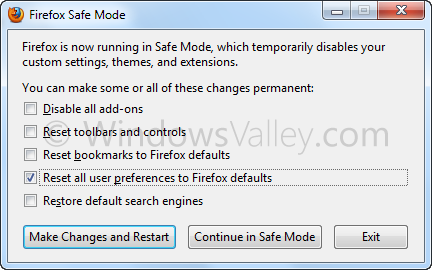
ResetFirefox

You can reset or restore rest of things too.

Applies To:

  • Firefox 3
  • Firefox 4/5/6/7/8/9
  • Firefox 10 Beta

Associated terms:
how to reset mozilla firefox, how to reset mozilla firefox to default, reset firefox, reset mozilla firefox, reset mozilla to default, reset mozilla, how to reset mozilla, reset mozilla firefox to default, restore mozilla, how to reset firefox, reset firefox to default, mozilla firefox restore, how to reset mozilla browser, how to reset mozilla firefoxx, firefox factory reset, restore mozilla firefox, mozilla reset, how to reset firefox to default, reset firefox to default settings, factory reset firefox

  • catra

    what about firefox v5

  • Kathalein

    never mind i worked it out, just ignore my previous question :)

  • Kathalein

    after i have opened the safe mode of firefox ( i have firefox 3.6.16) there is no box that comes up, i did exactly what you said, (there was no firefox at the start menu) so i went to run and entered what you have posted, firefox opened up but still no check box…

  • kenshin

    Wow, thanks a lot bro/sis for this. It works “,

  • Cynthia

    Nope, still same issue happening.
    I needed this b/c when I visit a html chat site, the chat room is not automatically refreshing. Getting message; “Firefox automatically prevented this page from redirecting to another page.” When I hit “Allow”, I get “Firefox prevented this page from automatically reloading.” When I hit “Allow” the message repeats.
    I’m guessing I clicked something to do accomplish this (duh on me) & can’t for the life of me figure out what it is & deselect it.

  • Cynthia

    That’s nice…. What if you have Firefox (newest) & have no folder in the start up menu? What do you do then? *snickering* Yes, I need resolution with this issue. No Mozilla folder in start up.

    • http://www.windowsvalley.com Author

      If it so; Open Run Dialog Box and type firefox.exe -safe-mode and click on OK to run Firefox in safe mode

  • Bossewitch

    i ran this but do not get the same screen = it’s missing the bottom box ‘make changes and restart’

    i’m from the dinosaur ages and still use windows 2000 on one of my computers.

    any idea what to do?

    kb@bossewitch.net

    • http://www.windowsvalley.com Author

      Which version of Firefox, you are using? Upgrade to latest v3.6.6