Install Windows 2000/XP/2003 using USB Storage Device (Pen Drive)

August 17th, 2009

We already blogged the method to install Windows Vista/7/2008 using USB pen drive, after this my few friends asked me to the same with Windows XP too. I tried to find out the solution but didn’t get simple and straight forward way to make this. Well today I have solution, who want to make bootable USB pen drive to install Windows XP.

Before we start, it requires:

  • USB Storage Device (Pen Drive) at least 1GB
  • Windows 2000/XP/2003 CD or Installation Source
  • and finally WinSetupFromUSB.
How To:

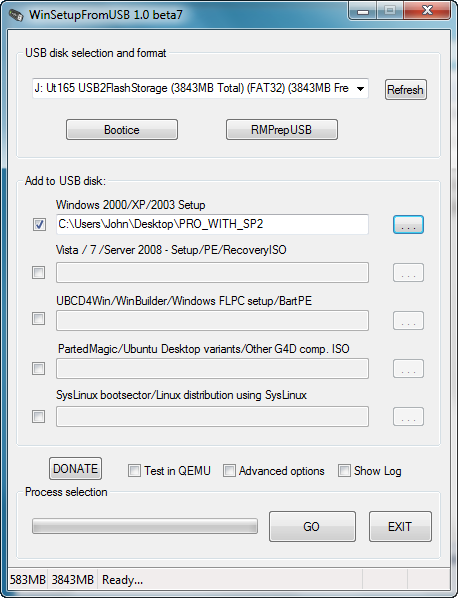
1. Download WinSetupFromUSB and install it.

Setup - WinSetupFromUSB

2. Plug your Pen Drive and run the program.

3. First of all local the CD or installation source of Windows, which contains I386/AMD64 folders.

4. In target disk type, the utility scans disk type automatically but you can to select Removable for Pen drives and Fixed for external USB storage device forcibly it doesn’t. Once you done. Its time to format the disk.

The utility gives two options.

  • HP Format Tool – to format 2GB or above of partitions.
  • PEtoUSB – to format up to 2GB of partitions

Use as per your pen drive size.

Formatting USB Drive

5. Clear checkbox entitled – Copy Setup boot files only. This option will copy just a minimal set of files (7-12MB). There is an option to change Windows installation directory too. You can set as per your interest.

WinSetupFromUSB 0.1.1

6. Now the most important part of process. There are two entries to be filled by Disk Nr. and Partition Nr.

Disk Nr.- on which of your disks Windows will be installed to. For example if you have two internal disks, first is disk 0, second is disk 1.
Partition Nr.- in which partition of the above selected disk Windows will be installed to. For example, you want to install this on C drive then its 1 and so on.

Note: Rest of part, you can leave intact, if you want to make bootable Windows XP pen drive only. Otherwise there are few more options to add extra stuff.

7. Press Go button to accomplish the task. Now restart your PC and boot from USB Storage device.

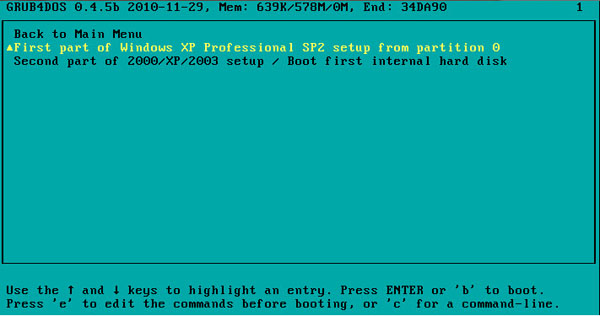
8. You need to follow 3-Steps Installation. Keep the USB disk plugged and start from USB 3 times.

  1. Text mode part of setup
  2. GUI mode part of setup
  3. Start Windows for first time

When the first step completes and system reboots, select Windows 2000/XP/2003 Setup – First and Second Parts, then Option 2 (second part) for the second stage of the setup.

DO NOT REMOVE THE USB PEN FROM USB PORT UNTIL YOU SEE THE WINDOWS START MENU

Applies To:
  • Windows XP
  • Windows Server 2003
  • Windows 2000
  • Windows Server 2000

Related Articles

19 Responses to “Install Windows 2000/XP/2003 using USB Storage Device (Pen Drive)”

  1. Martin says:

    @Arun
    try to change from AHCI to ATA mode in your notebooks BIOS.

  2. Mridhula says:

    While selecting the source path, i get the error – “Dosnet.inf file does not exist” though the file is availaible in i386 folder of disc1

  3. arti says:

    while choosing the source path, “could not locate dosnet.inf file” error msg was displayed and could not proceed with the process. Why does this error occur though the file was available in i386 folder of disc1. The dvd has two folders named disc1 and disc2.

    • Paddy says:

      formatting with the other option worked for me even though my drive was 2 gigs

  4. Arun says:

    it cannot install windows 2000. while burning it to pendrive errors r comming and says that it can install win xP 2 and 3 only………..

  5. henk spaan says:

    why do you have to boot from usb?
    is this necesarry to get i working ?
    i dont want to (re)install my machine where is create the usb pen

Leave a Reply