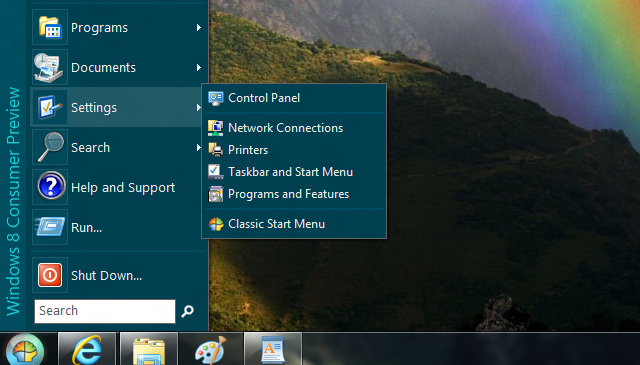
Microsoft made significant changes to Taskbar and Start Menu on Windows 7. One notable change is that, Classic Start Menu is no longer the part of Windows operating system. That could be a problem for loyal customers of earlier versions of Windows.
Here I have come with a solution, “Classic Shell” it replaces modern start menu completely and gives older version look and feel. Classic Shell also adds some missing features to Windows 7 and Vista like a a toolbar for Windows Explorer and a collection of features.
It has two core parts-
Classic Start Menu:
A clone of the original start menu, which you can find in all versions of Windows from 95 to Vista. Some features are-
- Drag and drop to let you organize your applications
- Options to show Favorites, expand Control Panel, etc
- Shows recently used documents. The number of documents to display is customizable
- Translated in 35 languages, including Right-to-left support for Arabic and Hebrew
- Does not disable the original start menu in Windows. You can access it by Shift+Click on the start button
- Right-click on an item in the menu to delete, rename, sort, or perform other tasks
- Available for 32 and 64-bit operating systems
- And last but not least – it’s FREE!
Classic Explorer
A plug-in for Windows Explorer that:
- Adds a toolbar to Explorer for some common operations (Go to the parent folder, Cut, Copy, Paste, Delete, Properties)
- Replaces the copy UI in Vista and Windows 7 with the more user-friendly “classic” version similar to Windows XP
- Handles Alt+Enter in the folder panel of Windows Explorer and shows the properties of the selected folder
- Has options for customizing the folder panel to look more like the Windows XP version or to not fade the expand buttons


good .. thanks
awsome…. thanx
1) Can you offer/include the XP icons for the Windows Explorer buttons?
2) Can you also allow the ability to re-arrange the Windows Explorer icon buttons?
3) Can you have the “Search”, “Help and Support”, “Control Panel”, “Documents” and “Favorites” Start Menu items use small icons while everything else uses large? Would help emphasize the commonly used items more.
By “Control Panel” I mean the “Settings” item.
“Run” doesn’t remember previously used commands.
This is just great!
Two things though..
With xp powertoys/tweak ui/registry change, I was able to change the folder expansion delay in xp.. I would prefer to be able to set it to zero if I like that.
Also it would be nice if the fade was optional because even if I have fade disabled in the rest of the windows 7 ui the classic start menu keeps fading when it opens.
Again… this is just what I needed, thanx!
Uninstalling classic shell did not bring the Windows 7 menu back
Hi there!
Classic Shell is really good!
Please keep on refining the software. :0)
Classic Shell is really THE BEST and…FREE.
Thanks.