Few days ago, we blogged step by step guide to install Virtual Windows XP on Windows 7, that requires hardware assisted virtualization.
Since we have got few queries, “How do I check my processor support hardware virtualization or can we install virtual Windows XP on Windows 7? So here is simple way to check it out and get rid of such queries.
Download the software tool called Securable from here. and run this program. This tool does not require any installation so it can be run directly.
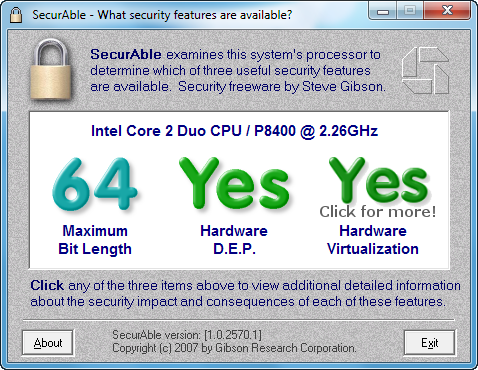
It checks basically three features of processors, that covers few aspects:
- Is it 64-bit processor?
- Does the processor support Data Execution Prevention(DEP)?
- Does the processor support Hardware Virtualization? that can be Intel-VT / AMD-V for Intel and AMD processors respectively.
Associated terms:
64-bit processor with hardware virtualization support, windows xp hardware virtualization, does my processor support hardware virtualization, does my hardware support virtualization, does my cpu support virtualization, how to know my processor supports data execution prevention, how to check your cpu supports virtualization in windows, how to check windows xp supports virtualization, how to check virtualization support in windows, how to see virtualizacion processor windows, my processor does not support hardware virtualization, why my processor does not support virtualization, windows check cpu support vt, windows check virtualization support, windows test cpu properties virtualization, windows xp check hardware virtualisierung, how can i know 64-bit processor with hardware virtualization support, hardware virtualization winxp, 64-bit processor with hardware virtualization support windows 7, can i upgrade my processor to support ha virtualization