Windows Media Player v11 and v12 provides a feature to share media between different computers on the same network, and can even share media with other devices as well. So if you are not using this features you should or can disable it to free up some KB of RAM.
How To:
1. First of all, you have to disable Windows Media Player Network Sharing Service. So Open up Services from Control Panel, or type services.msc into the start menu search/run box. Find the service in the list:
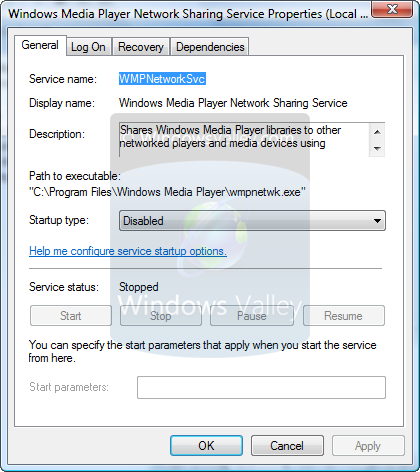
2. Open it up by double-click on it, and then change the service start up to Disabled.
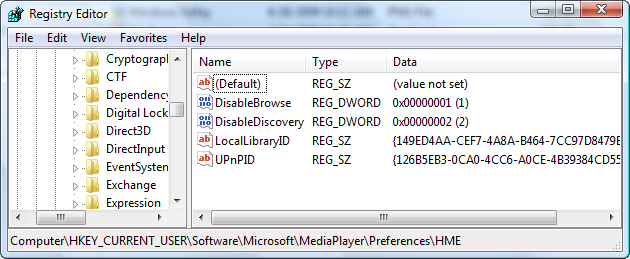
3. Now Its done ! but if you still facing some start up problem with wmpnscfg.exe, then follow these simple registry editing. Open Registry Editor.
4. Navigate to: HKEY_CURRENT_USER\Software\Microsoft\MediaPlayer\Preferences\HME
5. There should be two DWORD values called DisableBrowse and DisableDiscovery. Now just create or modify these values and set these to 1 and 2 respectively.
6. Restart your PC to take effect.
Applies To:
- Windows Media Player 11 (Windows Vista and Windows XP)
- Windows Media Player 12 (Windows 7)
Searched terms:
windows media player network sharing service configuration application, windows media player network sharing service disable, Windows Media Player Network Sharing Service, disable windows media player network sharing service windows 7, disable Windows Media Player Network Sharing Service, windows media player sharing, disable windows media player sharing, disable windows media player network, disable windows media player, windows media player network sharing service windows 7 disable
2 Comments
Ramesh,
I stopped all the Media Center Services from the Control Panel on Vista. I set DWORD values of DisableBrowse and DisableDiscovery to 1 and 2 respectively per your article. Now, the entire screen has gone black. The last steps has disabled the Windows interface when the system seems to boot up.
What’s you take on this behavior? Thanks.
Since I purchased HP pc with Vista pre-installed (I don’t have a copy of it), I decided to buy Windows 7 from Amazon yesterday. But my machine is no longer functional because tweaking the registry.
Hi Ramesh,
Your solution has proven to be working. Thanks! The black monitor is due to a sudden monitor failure a couple of days ago.
Add Comment