We already blogged the method to install Windows Vista/7/2008 from USB stick, besides, few readers want the same with Windows XP too. We tried to find out the solution but didn’t get simple and straight forward way to make this. Well now we have solution, to make bootable USB stick to install Windows XP.
Requires:
- USB stick (Pen Drive) at least 1GB
- Windows 2000/XP/2003 CD or Installation Source
- WinSetupFromUSB – A tool from MSFN community
How To:
- First of all, plug your USB stick and Open (My) Computer. Right click on USB stick and choose Format… to prepare it.
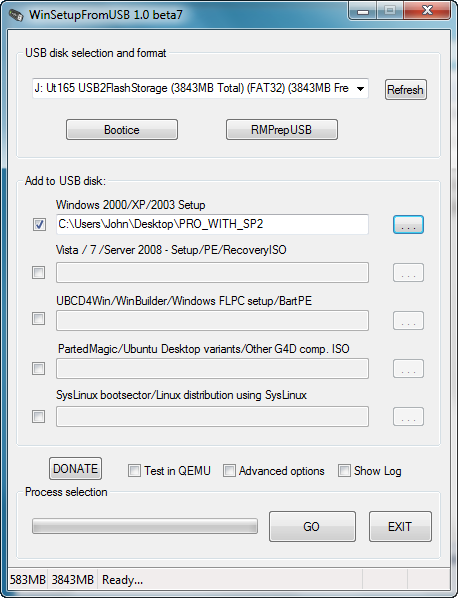
- Download and extract WinSetupFromUSB. Now run the utility.
- Mark checkbox corresponding to Windows 2000/XP/2003 Setup and locate installation source or CD that contains I386 or AMD64 folders.
- Now click on Go button to start copying installation source to USB stick and finalizing all sort of things.

- Once its Done! you can restart your PC and boot from USB stick. You need to follow 3-Steps installation, viz:
- Text mode setup
- GUI mode setup
- Start Windows for first time

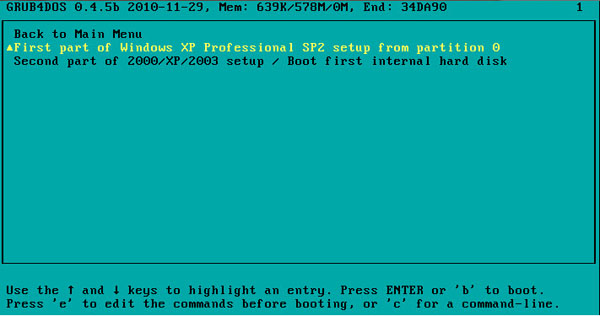
Start with First part of Windows installation; When the first step (Text mode setup) completes and system reboots, boot with USB stick again and select Second part of 2000/XP/2003 Setup and complete GUI mode setup. Now instead of boot with HDD, boot with USB stick one more time and choose Second part setup again and keep USB stick plugged-in until you see Windows desktop.
Applies To:
- Windows 2000
- Windows XP
- Windows Server 2003
– UPDATED 01/10/2011


Leave a Reply